Monday, 17 June 2013

Stored Procedures in SQL

Stored Procedures in SQL

Stored Procedures are set of Pre-compiled Queries . By word "Stored Procedures" we mean the set of statement that are only compiled first at time of first time they are compiled and stored and saved on SQL Server for use in future are called as Stored Procedures.


CREATE STORED PROCEDURES IN SQL

* First , Open your Microsoft SQL Server Management Studio software from Start menu as shown in image below


* Syntax for Creating Procedure :-

CREATE Procedure Procedure-Name
(
@field-Name-1  field-type
@field-Name-2  field-type

@field-Name-n  field-type 
  )


* where, CREATE Procedure is a Keyword used for creating procedures in SQL. Generally, keywords are fixed word or reserved words in Structured Query Language these have a special meaning in language desired for some specific work.

* Procedure-Name is name you want to Assign to Procedure you are creating. Procedure name can be any name except from keywords keywords can never be the name of Procedure

* These below statements are the fields of table with their their data-type defined in table. you should give only those fields in procedure round brackets ()  that are required in our procedure if you give extra fields in it then it will give error or force you to given that field also in stored query as it is not required there

@field-Name-1  field-type
@field-Name-2  field-type
@field-Name-n   field-type

EXAMPLE 1 :-   Create A Procedure For insert Query

create procedure insert_procedure
(
@rollno int,
@ename varchar(10),
@age int,
@course varchar(10)
)
as
insert into student values(@rollno,@ename,@age,@course) 

OUTPUT :-


EXECUTING PROCEDURE -- insert

Syntax    :-    exec Procedure-Name  values 

* exec is keyword used for executing procedures
* procedure-Name is general name of procedure
* values are required values for executing procedure


EXAMPLE 2:-   Create A Procedure For Delete Query

 CREATE Procedure del_procedure
(
@rollno int
)
as
delete from student
where rollno = @rollno


OUTPUT :-


EXECUTING PROCEDURE --     del_procedure

 
Syntax  :- exec procedure-Name value

* exec is keyword used for executing procedures
* procedure-Name is general name of procedure
* values are required values for executing procedure 


EXAMPLE 3:-   Create A Procedure For Update Query

We can do updating of data in table by writing it But we can use it only one time . For updating values one more time we have to write query one more time . But if we have created Procedure for Update Query then there is no need to write the query again and again . We can execute it directly number of times by supplying the required values.

CREATE procedure update_student
(
@rollno int,
@course varchar(10)
)
as
update student
set course = @course
where rollno = @rollno


EX
ECUTING PROCEDURE --     Update_student


Syntax  :- exec procedure-Name values

* exec is keyword used for executing procedures
* procedure-Name is general name of procedure
* values are required values for executing procedure


Friday, 14 June 2013

Joins in SQL

Joins in Structured Query Language (S Q L) are used to Store and Retrieve data from two or more Tables . Joins Store and Retrieve data On the basis of given Join Condition. The Given Join condition tells how and which data to retrieve / store in and from Database Tables.


TYPES OF JOINS :-

* Inner Join
* Outer Join
--* Left Outer Join
--* Right Outer Join
* Self Join

INNER JOIN :- Inner Join is used to Retrieve data from one or more tables . Inner join only retrieves the data that satisfy the given condition. Mostly in Inner join if three tables are used then a common data-type field like id of students is treated as common in all tables and data of student id is retrieved from all tables where id in first table matches with id in second table and id in third table


Fig 1.2

Query For Inner Join :- 

Select c.cid, c.name, c.branch , h.roomnumber, l.no_of_books_issue
From Student_class c
inner join Student_hostel
on
c.cid = h.hid
inner join Student_library l
on
c.cid = l.lid

# Where 
   * Student_class
   * Student_hostel
   * Student_library  are 3 Tables

# c.cid, c.name, c.branch , h.roomnumber, l.no_of_books_issue are fields of these tables with common data-type field cid, hid, lid.

RESULT :-
 
Fig 1.2

OUTER JOIN :-  Outer Join is used to Retrieve data from one or more tables . Outer Join generally Retrieve data from tables that is common in both tables along with the data on left or right table depending on  which join is used Right or Left Join . If left join is used output must contain all common values of both tables and all values of table2

LEFT JOIN  :-  Left Join will Retrive or Store data that has same common data-type in both tables along with the left table data that is not common in both tables. In left join query table given first will be treated as left table and second given table will be treated as Right table

QUERY :- 

select * from Student_class
select * from student_hostel
select * from student_library
select c.cid, c.name, c.branch, h.roomnumber
From Student_class c
left join student_hostel h
on
c.cid = h.hid


RIGHT JOIN  :-  Right Join will Retrieve or Store data that has same common data-type in both tables along with the Right table data that is not common in both tables. The Right join matches the values of two tables and It first finds the equal column values in two tables and at output it will include all equal values in both tables and all values of Right table
 

QUERY  :-


1.
select * from Student_class
select * from student_hostel
select * from student_library
select c.cid, c.name, c.branch, h.roomnumber, i.no_of_books_issue
From Student_class c
right join student_hostel h
on
c.cid = h.hid
right join student_library l
on c.cid  = l.lid

2. 
select * from Student_class
select * from student_hostel
select * from student_library
select c.cid, c.name, c.branch, h.roomnumber
From Student_class c
right join student_hostel h
on
c.cid = h.hid

OUTPUTS :-


1.                                                                                                   2.

SELF JOIN :-  Self join is operated on table itself. It is used to join the table to itself . The main purpose of self join is if you want to rename that table with same table columns.
QUERY :-


select * from Student_class
select * from student_hostel
select * from student_library
select c.cid, c.name, c.branch
From Student_class c
join student_hostel h
on
c.cid = h.hid

OUTPUTS :-

 CROSS JOIN :-  Cross Join produced the cartesian product of all column-values of two tables .  In cross join all rows of Table1 is matched with all rows of Table2 .
QUERY :-

select * from Student_class
select * from student_hostel
select * from student_library
join student_hostel 
on
c.cid = h.hid

OUTPUTS :-


Wednesday, 12 June 2013

datediff in sql

datediff in sql

Structured Query Language Provides Several Functions to perform date and time related operations. These functions allow you to add dates , times. To Find difference between dates and time etc.

1. CurrentDate :- Current Date is used to display current date according to date set in computer system.


Example :-
Select getdate ( ) as currentdate


2. Date Diff :- Date Diff function is used to find difference between two specified dates . 

SYNTAX :- 
DATEDIFF ( date-part , start-date , end-date )
* Date-part - It specifies what type of difference you want to find 
between two specified 
dates.
* Start-date - It is starting date from two dates to find difference 
of.
* end-date - It is ending date from two dates to find difference of.

DAY-DIFFERENCE

Query :- select datediff ( d, '2013-1-1' , 2013-7-2' ) as"DateDiff"

Month-DIFFERENCE

Query :- 
select datediff ( month, '2013-1-1' , 2013-7-2' ) as"Date Diff"


Week-DIFFERENCE

Query :- 


select datediff ( week, '2013-1-1' , 2013-7-2' ) as"Date Diff"


Year-DIFFERENCE

Query :- 


select datediff ( year, '2013-1-1' , 2013-7-2' ) as"Date Diff"


Hour-DIFFERENCE

Query :- 


select datediff ( hour, '2013-1-1' , 2013-7-2' ) as"Date Diff"


Minute-DIFFERENCE

Query :- 


select datediff ( minute, '2013-1-1' , 2013-7-2' ) as"Date Diff"


Second-DIFFERENCE

Query :- 


select datediff ( second, '2013-1-1' , 2013-7-2' ) as"Date Diff"


Monday, 10 June 2013

Grouping Functions in SQL

Grouping Functions :- Grouping Functions operate on sets of rows to give one result per group. Unlike single row functions, group functions operate on sets of rows to give one result per group. These sets may be full Table or Table split into groups .


TYPES OF GROUP FUNCTIONS :-

1. MIN( )                  2. MAX( )              3. SUM( )                   4. AVG( )              5. COUNT( )


Guidelines for using Group Functions :-

*  DISTINCT makes function consider only Non-duplicate values . If we use DISTINCT in our queries it take duplicate records only once
* All group Functions Except COUNT ( * )  ignore null values.
* When we use Group By clause it will produce result in Asc order by default and we can use Desc to make it in descending order.
_______________________________________________

1. MIN ( ) :- MIN ( ) function returns the minimum value of an expression , It does not take null values.

SYNTAX :-                    MIN ( DISTINCT (Expression ))

 * Here, Distinct keyword will not take duplicate records and eliminate them from output

Example :-   

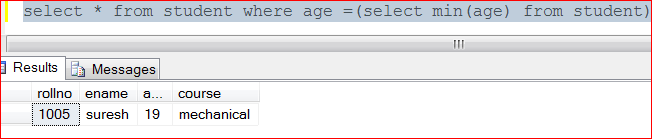
select * from student where age = ( select min( age ) from student ) 

* This is a sub-Query. A Sub-Query is a query within a query. Then query inside the inner brackets is called inner query and the query that contains the inner query within its brackets is called outer query. 
* First, the inner query is executed and result of inner query is given as input to outer query 
* In this query first inner query is executed and it gets the minimum value of age field in table 
* Outer query gets minimum age from inner query and show record of student with minimum age from table

Output :- It display the record minimum age student


2. MAX ( ) :- MAX ( ) function returns the maximum value of an expression , It does not take null values.

SYNTAX :-                    MAX ( DISTINCT (Expression ))

 * Here, Distinct keyword will not take duplicate records and eliminate them from output

Example :-   

select * from student where age = ( select max( age ) from student ) 

* This is a sub-Query. A Sub-Query is a query within a query. Then query inside the inner brackets is called inner query and the query that contains the inner query within its brackets is called outer query. 
* First, the inner query is executed and result of inner query is given as input to outer query 
* In this query first inner query is executed and it gets the maximum value of age field in table 
* Outer query gets maximum age from inner query and show record of student with maximum age from table

Output :- It display the record maximum age student


3 . SUM ( ) :- SUM ( ) function perform the sum or addition of all values in given field. It ignores Null values.

Syntax :-               SUM ( DISTINCT ( FIELD-NAME))
Example :-

select
From student

select sum ( age )
From student

Output  :- It shows the sum of all values in age fields


4 . AVG ( ) :- AVG ( ) function perform the sum or addition of all values in given field and then divide it by number of values in that given field and gives average of values of that field. It ignores Null values.

Syntax :-               AVG ( DISTINCT ( FIELD-NAME))
Example :-

select
From student

select avg ( age )
From student


5. Count ( ) :- Count ( ) function counts the number of rows in specified field of table . It also includes the duplicates values in the fields or duplicate rows of fields. 

count ( DISTINCT ( FIELD-NAME)) will provide the number of rows in particular field and it does not count duplicate values in fields.

Syntax :-              

count (( FIELD-NAME)) 
count ( DISTINCT ( FIELD-NAME))

Example 1:-

select
From student

select count ( age )
From student

Output :- It takes duplicate rows in count


Example 2:-

select
From student

select count (DISTINCT ( age ))
From student

Output :-  It does not take duplicate rows in count
 

Friday, 7 June 2013

Study SQL Commands

1. Group By
2. Having
3. Order By
4. Top


1. Group By :- Group By command is used along with select command . Generally, this command is used to group the desired result by eliminating the duplicate Column-Values and displaying them one time. The Syntax of Group By command is :-

SYNTAX :-

Select Column-name1, Column-name2
from Table-Name
Group By Column-name

EXAMPLE

Select Emp_Name, Emp_designation
From employee
group by Emp_designation

2. HAVING :- HAVING is used with select command and GroupBy command . Having is used in place of where clause if Aggregate value like aggregate salary or age related query is to be made to database. The Syntax  is as follows :-

SYNTAX :-


Select Column-name1, Column-name2
from Table-Name
Group By Column-name
Having function-Name ( Column-Name) Operator Value


EXAMPLE :-

Select Emp_Name, Emp_designation

From employee
group by Emp_designation
Having count(Emp_Salary) > 20000

3. ORDER BY :- ORDER BY Clause is used to Sort The result to be displayed. This Clause is used along with select Clause. If we use ORDER BY Clause then ByDefault it will display the data in Ascending order i.e. from lower value to higher value. But we can also display data in Descending order i.e. from Higher to Lower Value by using keyword 'Desc'

SYNTAX :-

Select Column-Name
From Table-Name
Order By Column-Name

EXAMPLE :-

1. 
Select Emp_Name 
From  employee
order By Emp_Salary  

2. 
Select Emp_Name 
From  employee
order By Emp_Salary  Desc


4. TOP :- TOP Clause or Command is used to display specified n number of rows from given  Table -Name. It is very usefull to use with large Table . As it consist of large no or rows so to display all rows is Time consuming task . So with TOP command we can display only required n number of columns .

SYNTAX:-

SELECT top *n
from Table-Name

EXAMPLE :-

1. 
Select top 2*  
From employee
It will display top two rows from table

2. 
Select top 2*  
From employee
order by Emp_designation

3. 
Select top 2*  
From employee
order by Emp_designation Desc

Thursday, 6 June 2013

SQL Queries

SQL COMMANDS 

* CREATE
* INSERT
* UPDATE
* SELECT


1. CREATE TABLE :- Create table is used to create a table witin the selected database.The Syntax to create table in SQL is :-

CREATE TABLE table-name
(
Field-Name1  Data-Type,
Field-Name2  Data-Type,
                  |
                  |
Field-Name-N  Data-Type,
)
Here, CREATE TABLE is Keyword used to tell SQL to create a new table within the selected database. CREATE TABLE keyword is following by a Right Paranthesis as a starting bracket . Then we will provide the field name it could be according to type of table  we have made e.g.- name, id , salary, designation etc.
Along with field name we give data-type that determines the type of data that field is expected to intake.

EXAMPLE :-

create table employee
(
Emp_id     int ,
Emp_Name   varchar(10),
Emp_designation    varchar(10),
Emp_Salary    int,
)

2. INSERT :- Insert command is used to input values or insert values in table of selected database. The Syntax to Insert data in table is :-

Insert into Table-Name Values ( Valuefield-1,Valuefield-2,Valuefield-3,Valuefield-N)

Here Insert, Into and Values are keywords 
Table-name is name of table in which you want to insert  data
Valuefield-1,Valuefield-2,Valuefield-3,Valuefield-n are values that we want to assign to fields or colums of table . Values in this statement are given in order in which fields or colums are declared in Create Table command previously.

EXAMPLE :-

1.  INSERT INTO employee VALUES ( 1001, 'Pawan' ,'SWO' ,45000)

2. 
INSERT INTO employee VALUES ( 1002, 'Rohan', 'Peon', 15000)

3. DELETE :- Delete command is used to delete row from table. The syntax of DELETE is as follows :-

Delete from Table-Name 
Where column-Name= 'column-value'

Where Delete is keyword used to tell SQL that we want to delete data and From is also a keyword used to specify table-Name 
Column-Name and Column-value is used to identify which row is to delete

EXAMPLE :-

Delete from employee
Where Emp_id=1001

4UPDATE :-Update command is used to Edit, modify or update particular column-value. The Syntax of Update command is :-

update Table-Name
Set Column-Name = column-value
where Column-Name = column-value

Here, update keyword is used to tell update work is to be performed

EXAMPLE  :-

1.
update employee
set Emp_designation = 'Manager'
Where Emp-id = 1001

2. 


update employee


set Emp_designation = 'Manager'

Where Emp_salary>40000


3.
update employee


set Emp_designation = 'Manager'

Where Emp_Name = 'Pawan'

USE REPLACE INSTEAD OF UPDATE 
we can also use Replace instead of using update queries . It can be used in situations when sometimes we have a field 'Name' in Table 'Table1' and we have inserted wrong spellings  of Name of a person in Table and we want to correct it In this case instead of using three line query of Update we can use single line query of Replace. 

Syntax :-
Select Replace ( String or string variable , old String  , new String  )

EXAMPLE :-

Select replace ( Emp_Name , 'ruhan' , 'rohan' ) 


5SELECT :- Select command is used to retriece data from Tables of Database. The Syntax of Select command is as follows :-


Select { * , column-name}

from Table-Name


  • Here, SELECT is keyword used to tell which colums is to select.
  • FROM is a keyword used to identifies which table is to use.
  • '* '  :- If Asterisk '*'  is used with select statement then This statement will display all colums and rows of database.

EXAMPLE  :-

1
Select * from employee
This statement will show all data in database

2. 
Select Emp_Name,Emp_Salary
From employee

USE DISTINCT WITH 

If we use Distinct keyword with select statement It will suppress the duplicate column values
The syntax is as follows :-

SELECT  DISTINCT { * , column-name}  FROM Table-Name

EXAMPLE :-

Select Distinct  * from employee


5. DELETE :- Delete query in SQL is used to delete the specified row from table .The entire row will be deleted from table and others rows will not be affected . A set of rows can also be deleted from table by using specific condition . It is mostly used with where clause. The Syntax of DELETE command is :-

SYNTAX :-
DELETE      From  Table-Name
Where     condition 

In Syntax :-
* Table-Name is name of table on which delete operation is to perform
* condition tells which and what number of rows are to be deleted from table

EXAMPLE :-  If we have a table consist of fields shown in image below :-


QUERY :-

delete from student
where rollno=1003

OUTPUT :-


Wednesday, 5 June 2013

INTRODUCTION TO SQL


SQL stands for Structured Query Language . It is Pronounced as see-kwell or s-q-l. SQL is designed By IBM. SQL is developed in 1986.SQL is the best DataBase used today for storing data.


SQL is language used to create and manipulate Relational Databases. By Relational Database are sets of information stored in relations or tables.

The main difference between DBMS and RDBMS is
In DBMS data is stored in DBMS accepts the ‘flat file’ data and In RDBMS data is organised in tables in rows and columns that relates each other.
 In DBMS there is not relation between data. In RDBMS we can relate one table data with other using Foreign 
key.
DBMS does not have constraints and RDBMS consist of constraints :-

* Not Null
* Check
* UNIQUE
* Primary Key
* Foreign Key

EXAMPLE OF CONSTRAINTS :-

create table employee
(
Emp_Id varchar(10), Not NULL Primary Key
age int ,
check(age>18),
)

Microsoft SQL SERVER And Visual Studio

Microsoft SQL server is Relational Database Management System used to store data in database and to manipute data using different queries.Microsoft SQL server Automatically installed When we install Microsoft Visual studio .

INTERFACING SQL SERVER WITH VISUAL STUDIO

To interface SQL server with visual studio we require Microsoft SQL Server Management Studio software. You can freely download it from link below :-

http://splashurl.com/lwkngvl

INTRODUCTION TO VISUAL STUDIO

Microsoft Visual studio is a Software Developed by Microsoft to Develop console and GUI(Graphical User Interface) applications. It is also used for creating Web Applications and Web services.
The Major feature of Visual Studio is that it is Not Case Sensitive Language. It also consist of Intellisense window that suggest the code that can be used at that particular time.Microsoft visual studio has another very important function that it contains multiple programming languages. Current Microsoft Visual Studio uses Three languages :-


* C#
* Visual Basic
* j#

Microsoft Introduced .net framework with visual studio software. .NET Framework Includes :-

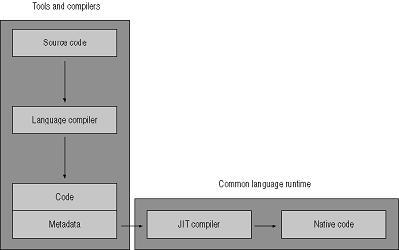
* CLR -COMMON LANGUAGE RUNTIME :- CLR is Multilanguage runtime engine used to run codes of different languages. CLR is an Execution engine that takes the MSIL (Microsoft Intermediate Language ) code as input and converts it into Native code. Native code is codi in Machine Language.  MSIL code is given to CLR is generated by compiler. 


CLR CODE EXECUTION PROCESS


* When we compile a programme written in any programming language supported by .net Then compiler first converts that code into Microsoft Intermediate Language (MSIL).

* MSIL code consist of two parts 

-- Data
-- Metadata

Data + Metadata is stored in assenbly file with extension ".assembly". This Assembly file consist of PEF(Portable Executable format)


PEF(Portable Executable format):- It is a file format for executable,object code, DLL's and Font Files . The word Portable means it is adaptable or changable to different windows achitecutres. This file contains information for Operating Systems to load Exe file . 


PEF generally in .NET loads MSIL code and metadata . Metadata describes all classes and class members that are defined in the assembly. The metadata contains complete description of method or function along with class.


 Then MSIL code is given to JUST IN TIME Compiler that translates the code from MSIL code to Native Code

* After code is converted to Native code, it is sent to .NET Runtime Manger 

* .NET Runtime Manger  then performs the security check on it to ensure code has permission to access the Availaible resources.